Create Workspace
A Workspace holds Jobs, Notebooks, files, JDBC endpoints, its own access management and its own secrets. Workspaces belong to a Tenant.
Open Workspaces in the Yeedu navigation panel to reach the list.
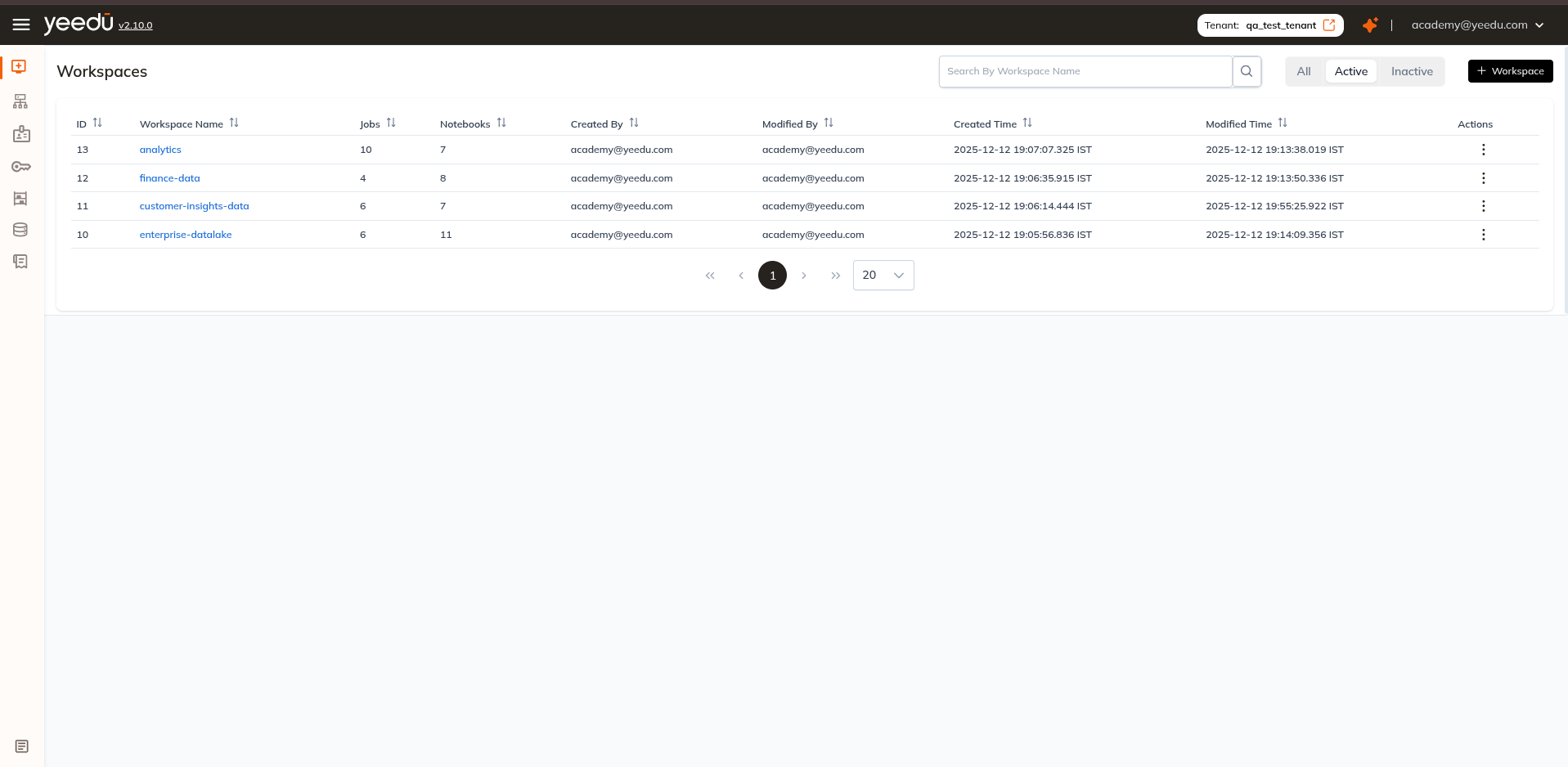
Workspaces list
Toolbar: Search By Workspace Name, three filter pills with counts, All, Active (default), Inactive, and the + Workspace button.
Columns:
| Column | Description |
|---|---|
| ID | Workspace ID. |
| Workspace Name | Links to the Workspace, landing on its Runs tab. |
| Jobs | Number of Jobs in the Workspace. |
| Notebooks | Number of Notebooks in the Workspace. |
| Created By | User who created the Workspace. |
| Modified By | User who last modified it. |
| Created Time | Creation timestamp. |
| Modified Time | Last modification timestamp. |
| Actions | Row menu (⋮). |
The Actions (⋮) menu contains:
- Edit : opens the Workspace dialog to change the name or description. Shown only for active Workspaces.
- Inactive : disables an active Workspace. On an inactive Workspace this entry is replaced by Active.
- Import : imports previously exported Jobs and Notebooks into the Workspace.
- Export : exports the Workspace's Jobs and Notebooks. Its tooltip reads Thrift jobs will be excluded from export.
Create a Workspace
Click + Workspace on the Workspaces list. A dialog opens.
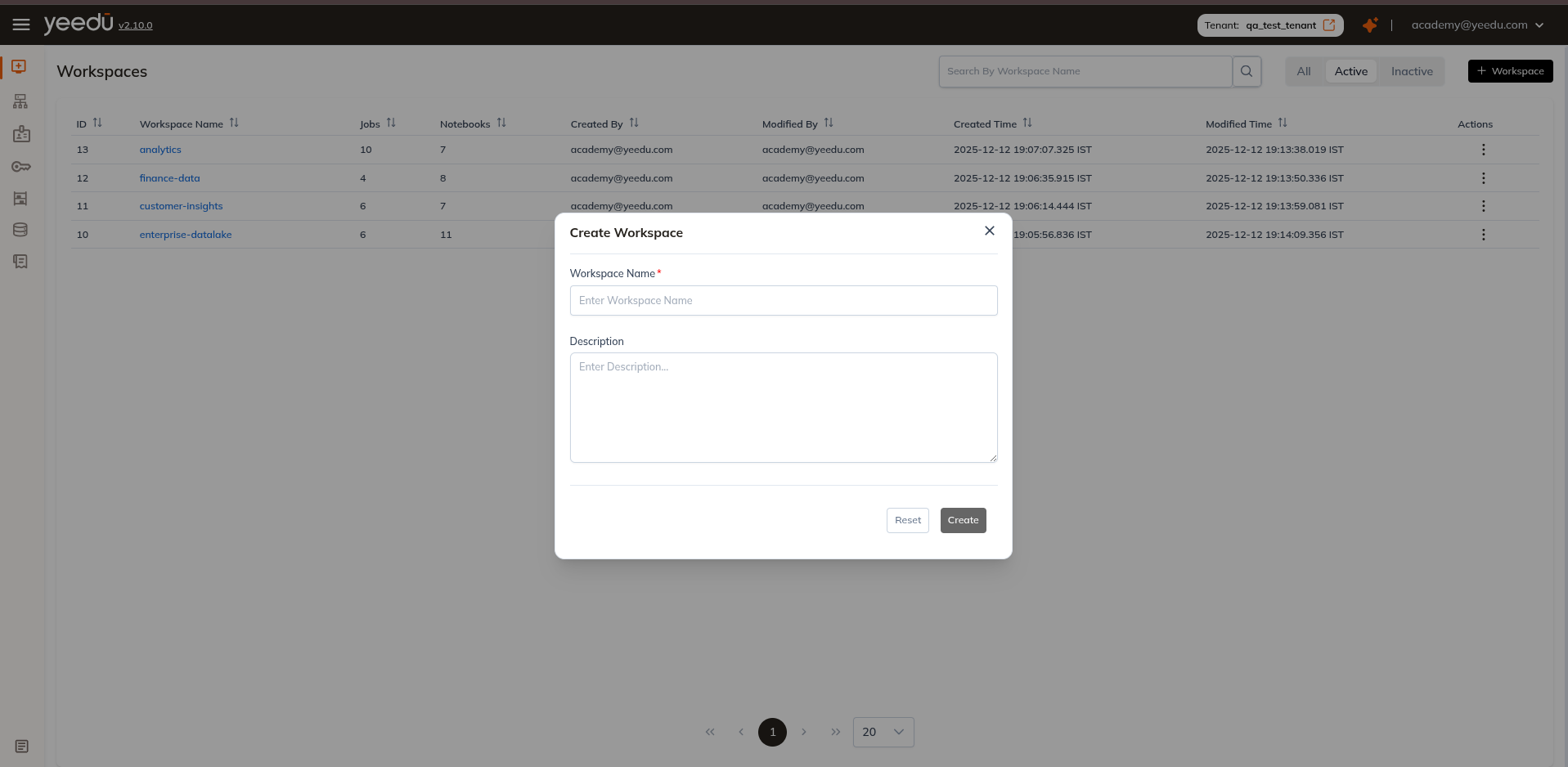
| Field | Required | Description |
|---|---|---|
| Workspace Name | Yes | Placeholder Enter Workspace Name. Lowercase letters, digits, and _, ., @, -, up to 64 characters. An invalid value shows Invalid format. Max 64 lowercase letters, 0-9, _, ., @, or -. |
| Description | No | Free text. Placeholder Enter Description... |
Buttons: Reset and Create. We keep Create disabled until the name is valid.
We create the new Workspace Active, and we grant its creator MANAGE permission on it.
Workspace Permission Matrix
| Ability | MANAGE | EDIT | RUN | VIEW |
|---|---|---|---|---|
| Workspace Access Management | ✔ | ✖ | ✖ | ✖ |
| Update the Workspace, or make it Active / Inactive | ✔ | ✖ | ✖ | ✖ |
| Import into the Workspace | ✔ | ✔ | ✖ | ✖ |
| Create or update Job and Notebook configurations | ✔ | ✔ | ✖ | ✖ |
| Make a Job or Notebook Active / Inactive | ✔ | ✔ | ✖ | ✖ |
| Run or stop a Job or Notebook | ✔ | ✔ | ✔ | ✖ |
| Read Job and Notebook configurations and run history | ✔ | ✔ | ✔ | ✔ |